Ehler

Ehler

Thoughts and resources on music, education, and more.

  • Home
  • Resources & Projects
  • About
  • Resources on Github
  • @ehlerMastodon
  • YouTube
  • SoundCloud
  • LinkedIn
  • Last.fm
  •  Music
  • Letterboxd
  • Contact
  • OmniFocus 4.7

    I started testing out OmniFocus 4.7 right as I was starting work for the current school year1. Its marquee features were the addition of “Planned Dates” and more control over repeating events. The latter I didn’t think I really needed, and I wasn’t sure how much of a difference the former would make.

    OmniFocus has remained an integral part of my workflow for my entire teaching career, but I’ve let it get out of control the last several years. It wasn’t that the system stopped working for me, it was merely that I didn’t have the time or space or energy to get it back under control. I refused to “declare bankruptcy” with it, but even over the summer, I couldn’t make myself go through and purge old projects. I thought I had reached the point where there was too much to balance for any system.

    Planned Dates motivated me to adjust my approach with OmniFocus just enough that I picked up the momentum to get things back under control. It took some time, but I’m feeling much better about a lot of things at work overall by just having OmniFocus be a more trustable place for my tasks, and be more under control. I’m not sure whether or not it was the feature of Planned Dates themselves that led to that, or if it just got me to spend enough time cleaning things that I felt in control again.

    I think I’ve written on here before about having tasks multiple decades away in OmniFocus. It remains an incredible tool for managing my entire life.


    1. it actually released on August 26, and we’re already up to OmniFocus 4.8. ↩

    Ehler

    2025-09-19
    Technology
    omnifocus, productivity
  • Song & Symphony Connection (Mahler/Billie)

    Yesterday afternoon, I had a song stuck in my head, which was the Billie Holiday recording of I’ll Be Seeing You. I knew it was in my head, though, because of it being featured in a movie or TV show — I could tell from the way it was running through my head that it wasn’t because of my familiarity with the original recording. But I wasn’t sure what it was from, so I turned to a quick web search.1

    I quickly turned it up: The answer was Severance (which I heartily recommend). In pulling up that answer, I was on the Wikipedia page for the song, where there is (at time of writing) a mention of a musical connection between it and the 6th movement of Mahler 3.

    So for those who haven’t the pleasure of making this discovery yourself, the Billie Holiday recording from the outset of the first verse aligns with the theme in Mahler 3:VI2 as early as the first minute. Other fragments come back around later on. I’d love the article cited on the Wikipedia page if anyone has it.

    This post is basically just a longer exposition of a single sentence from a Wikipedia article, but I thought it was pretty neat and wanted to highlight it. Were you going to visit that Wikipedia article this week?


    1. I’m using Kagi these days instead of Google. I should write about that. ↩
    2. Don’t get made at me for this way of writing about a movement. I know it’s wrong, and I’m trying this personal growth thing where I don’t care about every mistake. But I will write a footnote making a tepid defense of it. ↩

    Ehler

    2025-06-25
    classical, music, okay let’s be pedantic about calling it classical music
  • Dorico 6: Worth the Wait

    Dorico 5 to Dorico 6 has been the longest gap between major version releases in the program’s life thus far.1 Among other things, many free updates during the lifecycle of 5 (many of which were to help users coming from Finale) kept things busy. But in spite of all the smaller updates throughout the lifecycle of 5, Dorico 6 delivers in the scope you would expect, perhaps being the biggest upgrade since Dorico 2.

    As ever, Scoring Notes is going to have the best and most detailed review, I’m just offering opinions as a band director. The “Making Notes” blog at Steinberg also has interesting information.

    Dorico 6 is a big update. It’s awesome. It’s exciting. It’s worth the upgrade price. If you go through Steinberg’s upgrade flow, you’ll have it up and running before you could finish reading this article. I have little idea of how Steinberg is going to market the update, though, and in my opinion, the most impressive “headlining” features for most people are not half as big or impactful as so many other features in it. The update is jam-packed with small improvements in addition to new systems.

    Engrave Mode’s Big Day

    The team has made a massive improvement to Engrave Mode in the form of rulers and guides. It’s been awhile since I’ve done particularly complicated layout work for a student resource, but keeping things aligned always proved to be one of the principal challenges. In the past, I’d have to do a lot of setting of positions in the properties panel manually, but guides will allow much more of that work to be done graphically. I am hoping for this feature to be followed up by some kind of snapping, but I’m happy today for guides as they exist.

    I assumed I’d feel like rulers are just a feature ‘along for the ride,’ but going back through some recent projects with the rulers on, I might actually make some tweaks to how I approach a few things in the future being able to see more clearly where I hit the page margin vs the music frame margin.

    Proofreading

    When I saw the notes on Proofreading mode, I thought it was a feature aimed at people less experienced with notation software. The sort of people who don’t listen to podcasts about it and make it a part of their personality. Then I started handling projects in Dorico 6.

    Proofreading mode is amazing.

    It’s the sort of feature that, now having gotten used to it, shocks me that it hasn’t been a standard feature in all notation packages since 2002. Sibelius and Finale have historically had plugins that can do some of these things, but this is an amazing implementation that works very well. When I work with student composers and arrangers, this will be a big part of trying to push them off of MuseScore into Dorico. It’s also saved me a reprint of an editing project or two.

    Jump Around

    Introduced in Dorico 4, the Jump Bar has been a productivity boon for awhile. Being able to quickly set an accidental as parenthesized or enable an l.v. tie without taking my hands off the keyboard to do so in the properties pane makes using Dorico better.

    Dorico 6 has made it even more powerful, but in a way that helps newer users especially; it now surfaces options.

    With all the Finale users coming to Dorico, it’s been a nice reminder of how the “Dorico Way” takes some getting used to. A lot of the “opinionated” things Dorico does aren’t hard to change, but odds are, you want to change them across the whole project (e.g. cautionary accidentals, beaming rules, splitting the bar…) rather than every time they occur, unless you intentionally want an exception somewhere. By putting options in the Jump Bar, users will ideally be guided back into these options when using the jump bar to change things.

    All the Small Things

    There’s a lot of “smaller” features too that were added (though I question whether the effort behind any of them would qualify as small), and it’s really easy to miss them with the size of the version history.

    A big one is the ability to import and export user settings. I’ve personally tweaked so many defaults for myself over time that I’ve forgotten half of them, I was working with some new Dorico users recently and while the Library Manager is a great way to change a lot of things for an individual project, I’m going to wind up sharing my defaults with a lot of people (including here soon) to help others out.

    Paragraph Styles got a lot of love and refinement, including moving a lot of things out of Engrave Options into Paragraph Styles (such as distance from the staff settings). One particular new Paragraph Style setting is “case” so you don’t have to put the project title in all caps any more (and thus be yelling at yourself in your file names) in Project Info if you want it in all-caps in your actual layouts.

    The Popover itself got some new superpowers that I also have to fawn over. For lyrics (and now also chord symbols) it’s a bit more obvious and helpful when navigating between different ‘lines’ (verses in lyrics and sets of chord symbols). Further, for the kinds of Popovers that can be applied to only one player (like a time signature or key signature) this is vastly more discoverable with a little dude next to the text input field, rather than having to remember that it’s the ⌥ key.

    Headline News

    While Proofreading is one of the “headlining” features, it’s worth mentioning the others.

    Cutaways are impressive for those that need them. I have something saved from IMSLP myself to play with the feature when I have time. In education, I don’t know how much they come up, but this goes firmly in the category of things in Dorico where, if you need it, it’s thoughtfully delivered. Reading the Version History on this particular feature reminds you very acutely that the team at Steinberg aren’t just people making a program, but true music nerds at heart. It was probably the best mini musicology lesson I’ve had yet in 2025.

    Chord symbols received a lot of love in this update. If there was something you couldn’t do with them before, chances are you can now. I personally wasn’t running into limitations before, but in the jazz arranging or editing world, I imagine some were.

    For Cycle Playback and Fill View I don’t really have much to share; it seems to me the latter is made much more useful by having a big monitor.

    Another Playback Feature

    When Dorico 5 came out, there were people upset that it was too focused on playback features. In fairness, it was a bit lighter in other areas.

    Well, those same people will be deeply disappointed to know that playback features are still improving in Dorico, though this time in ways I’m much more materially excited about: Steinberg now includes a marching percussion sample library, which is a solid improvement. In fairness, they face stiff competition from MuseScore in this regard, with really impressive drumline materials on that side of the fence.

    Where do we go now?

    Some time ago, I laid out every “complaint” I wanted to see improved in Dorico. The screenshot of a checklist I made in Marked is stretching really funny on iOS. Maybe one of these days I’ll do some more serious work on this site.

    On the engrave mode front, as mentioned above, we have guides now. There’s also flow heading overrides in this version, which are really the improvement I wanted at the time for flow headings.

    Even though I’ve gotten a really good feel for a lot of option changes’ effect (and they describe things very well), I’d still love a way to preview the option changes I’m making on the project I’m working on. The only real way to do this is when I’m working with a second monitor right now, moving the options over to that monitor and watching when I hit “Apply.” I find that a bit awkward, and I often lack my second monitor, so I still desire a different solution here.

    Percussion notation has gotten a lot better, but my standards for it have gotten more aggressive too in honesty. 4.3 solved my biggest complaint by making common roll conventions much more straightforward to input (i.e. with the addition of rel as a popover suffix when inputting them).

    Percussion notation in Dorico works differently to most other instruments to allow for the needed flexibility, but the behaviors around it are a bit different as a result. Bringing that into the “promised land” remains a hope for me, as does (somehow) making it more intuitive for new users, because I’ve been trying to guide some people on what they’re doing with percussion and seeing their confusion.

    One new gripe I have, perhaps because I thought I could solve this with the addition of some other features, is changing the preferred order of instrument transpositions. I want my Euphonium to default to non-transposing, darnit. Maybe I have just missed how to do this if it was added at some point in the 5.x lifecycle and need to dive deeper.

    With the jump bar, I think I can live at peace with the fundamental disagreements I have with the Dorico team about a philosophy of keyboard shortcuts. My beliefs haven’t changed, and maybe time has just worn down my commitment to them, but if I were going to remake an awkward checklist graphic, I’d strike it out at this point.

    Wishcasting

    With all these impressive new features, it’s still nice to think about what I’d like to do in the future with Dorico and what “major” features I’d like to see beyond things I merely believe it can continue to do better than it already does.

    The big one is support for Roman Numeral analysis. On the heels of figured bass, some speculated it would follow shortly, but it hasn’t. What do I want it to do that isn’t already served by the MusAnalysis font? I’m not actually sure, but I’m still convinced I want it.

    I’ve begun thinking about another feature I desire that is…a bit hard to describe honestly. I think “transpositional text tokens” roughly describes the idea. I’d like to have tokens that I can place alongside other text (whether that’s in a flow heading or a text frame for a work sheet) where I could place something like {@ConcertF@} and in a flute part it labels it “Concert F,” but in an Alto Saxophone part it labels it as “D (Concert F),” with a few different configurations of this (e.g. omitting the word ‘concert’ in C parts, taking out the concert pitch reference in transposed parts) settable in options. This would really open new doors in the kinds of resources I could efficiently prepare for students.

    It’s kind of rude of me to even start to flesh out that token idea in a blog post rather than submitting it as a suggestion on the forums, but this is the first time I’ve thought to put this nebulous idea into words and I’m busy.

    I think it’s noteworthy that, of all my wishes and desires, I can’t envision the interface for them or how they might be achieved otherwise. While I’m no software designer, I can usually imagine how I’d like to use a feature in a pretty reasonable way. But if I can’t even see in my head how it might work in an abstract way, then it strikes me as fruit pretty high up the tree to be asking for from the Dorico team.


    Dorico 6 is going to make my daily work better, faster, and easier. And that’s before 6.0.10 or 6.1 or anything more to come in the Dorico 6 lifecycle. The team should be proud of their release, and anyone who really appreciates this program should be excited to see all these great additions.2


    1. 3.5 was a “major” version apart from the rest of the 3 series. Dorico 4, the first post-COVID release, came 602 days after 3.5. Dorico 6 comes 707 days after Dorico 5. ↩
    2. Aside from not wanting the other footnote to feel lonely, I wanted to apologize for the corniness of the headings throughout. I rushed to have this ready for release day, but life got in the way. ↩

    Ehler

    2025-05-01
    Music Education, Technology
    apps, dorico, notation software
  • Some App Finding Resources for You | Amerpie by Lou Plummer

    Some App Finding Resources for You | Amerpie by Lou Plummer:

    Lou’s site is a great set of recommendations, and I’m glad to see some of what he shares for sources on here. I’m not trying out new apps every week, but there’s lots of cool new things out there all the time.

    (First try at a link blog over here…)

    Ehler

    2025-04-13
    Technology
  • Productivity Apps I Don’t Use

    I’ve written plenty about apps I use out of the scant writing I do on this site.1

    But while I love to think about my personal productivity system, there’s lots of good tools out there beyond what I use that are worth being on others’ radar.

    The biggest reason why I haven’t so much as tried most of these options isn’t because they seem to have any particular flaw. But it’s been seven years since I last seriously considered leaving OmniFocus. I’m very, very, very satisfied. I’m not interested in even humoring the idea of moving task apps. And everything else in my productivity environment kinds of flows from my use of OmniFocus. But I can still appreciate when I see an appealing option in the task/productivity space.

    I recently saw Godspeed recommended. It’s a pretty neat looking task app. I like the idea of it being totally keyboard driven. I think the hat tip on this goes to Robb Knight (though my recollection isn’t perfect).

    I never kicked the tires on Wunderlist back when it was around, but the makers of it are back to make Superlist. It’s worth knowing the existence of.

    NotePlan has been around for awhile now, but it seems to have more steam than ever lately from the people I see posting on forums, blogs, Mastodon, etc. I like keeping things in their own bucket, but if you’re looking for a do-it-all app, this has long looked like one of the best options.

    When I was last looking at leaving OmniFocus, I was weighing it against Things. I actually bought Things on all platforms in hope of setting family members up on it (through Family Sharing). It’s a great app, it just turns out I find a lot of value in the ‘heavier’ features of OmniFocus. Also, the way I use projects makes a ‘progress bar’ an indicator I don’t want to see.

    The most interesting app I’ve seen come around lately is Twos. I actually downloaded and tried this one (though I knew before doing so that it wasn’t going to have a permanent place in my life). To be honest, the gameifcation in it is weird. I feel like some essential feature (like trash!) being gated is bad too. But it’s an app that I could recommend pretty easily to students because of how featureful it is without paying any money.

    There’s a category of apps that aren’t full to-do-lists, but are a lot simpler in their presentation. I’ve had Streaks for awhile (though I don’t actually use it a ton, and I’m not faithful about keeping any streaks on it right now). I recently saw Did I Do, an app in a similar vein that I don’t see a need for personally, but is interesting nonetheless.

    As always, none of these are referral links; these are all just things I sincerely wanted to share that might be of interest to anyone who has read other productivity posts, but isn’t sold on the specific tools I’m using. There’s an overabundance of great productivity tools out there beyond these, but these have been on my radar as neat options the last few months.


    1. I have more interests than just software! I once believed I would write about a lot more on this site than the narrow topics I actually cover. But it turns out the things I want to put out into the world are things I think others would find actual utility from; other…insightful thoughts I have that I do bother to write about are mostly cathartic, and that catharsis doesn’t require me to share them out into the world. The people who are subjected to my opinions on other topics suffer enough for all of you. ↩

    Ehler

    2024-11-25
    Technology
    productivity
  • Dr. Drang’s Terminal Tips

    Dr. Drang’s Terminal Tips

    While I’m not a programmer or a developer, I do like to get a lot nerdier than most, and that often means delving into the terminal. I know some basic things while I’m down there and have customized mine a bit, but I’m still definitely a novice – I wouldn’t be comfortable writing any bash scripts myself.

    Dr Drang, who writes a very good blog and is very smart, recently put out some helpful blog posts for Mac users to make some terminal operations a bit smoother.

    • In his first article he talks a lot about jumping between the terminal and Finder
      • My preferred way of getting from Finder to the terminal is invoking Alfred’s universal actions, but I also like using Alfred’s file browser to the Finder when it’s practical.
    • His second article is focused on other ways to do things in his first, including scripts contributed by someone named Loren Halter.
      • Most notable among these is the good doctor’s sel command which I could see getting some actual use out of, thoough it’ll require some time to actually set up.
    • The third is beyond me I think! But I wanted to include it because it was related.
      • I have before sic’d the touch command on a list to make Markdown files just to set up a demo/test directory for student information tracking in Obsidian.

    I really like Dr. Drang’s blog, but sometimes I have a hard time revisiting his older posts on the same topic, so this is more of an index post for myself!

    Ehler

    2024-09-24
    Technology
  • End of Finale

    It’s the second-busiest time of the year, but there’s very little news that gets bigger than this.

    In 2012, I had to do my first serious arranging project. I had found Bill Holcombe’s arrangement of Liszt’s Liebestraum #3 for tuba quintet in a jazz style. A short presentation on Animal Collective’s Cuckoo Cuckoo the previous year had led me there, and I recruited some friends to play it for Iowa’s State Solo & Small Ensemble Festival before our Winter Break. Being somewhat ignorant, though, I assumed that a tuba quintet was for five tubas, not a mixture of tubas and euphoniums – so with Bill Holcombe’s permission, I set out to arrange it down a fifth to sit in our range, rather than find a second or third euphophonist.

    I had no budget, so at the time, Finale Notepad was my only option. Dorico did not exist yet, MuseScore wasn’t on my radar1, and I don’t believe there was a free option for Sibelius, so unless I was willing to pony up more money than any high schooler would tend to, Finale NotePad was my only choice.

    I thought I could do the whole project – five parts of 181 measures – all by clicking my notes in. I realized before I was part of the way through that I needed to learn the shortcuts to have any hope of ever finishing the project. I had lots of frustrations, some inherent to Finale, some inherent to the NotePad version2. When I later went to college, I would eventually buy the full version of Finale. I still remember sitting in my freshman dorm as my best friend worked on jazz transcription and I did something else in Finale, and us both cursing it to the moon for one frustrating behavior or another.

    When I was an undergrad, I felt like everyone used Finale except the composition students. When I took Arranging For Band, we were guided through the Sibelius tutorial, but allowed to arrange in whatever software we liked (I liked some things about Sibelius on our lab iMacs, but I couldn’t abide by its terrible shortcuts on a laptop…) and I jumped right back over to Finale. I saw a lot of arrangements of peers, and was eventually motivated to clean up some of my engraving in Finale (or to just learn the software well enough to not leave an empty bar at the end of every project – something Finale made it all too easy to do for the novice user).

    As I had more and more projects where it was necessary for me to edit parts of arrange things, I got fast at Finale. If there were races for digital music copyists, I thought I could hang with any professional working with notation software. Among other things, seeing our conducting TAs working in Finale on their Macbook Pros made me envy the portability and battery life (compared to the Windows laptops I was used to) for working specifically in notation software that eventually brought me to the Mac.

    Over my college career, I kept pushing my skills and understanding of Finale, but after Dorico came out, I was impressed with what I was reading, and tried it. There were a few things about it that didn’t stick for me in version 1, but when I came back to Finale, I felt dirty drawing smart shapes and going into obscure tools to make everyday changes. I realized that there were so many ‘easy’ things that were hard in Finale, and Dorico’s release was actually the reason I switched from Finale to Sibelius, funnily enough. I learned Sibelius as well (and better) than I ever knew Finale, and never really looked back, eventually moving to Dorico.


    Finale announced today that it’s done.

    There are lots of nerd ‘holy wars.’ Mac vs. PC, vim vs. emacs, and amongst music computer nerds, Sibelius vs. Finale was one of the hottest. For over a decade, they were really the only two options for anyone truly serious about their notation software.

    Once upon a time, though, Austria was afraid of the Ottoman Empire.

    Finale, by its architecture, appears to have had bigger issues with “technical debt” than Sibelius ever did. To get real nerdy with it for a second, it wasn’t using a cross-platform framework like Qt to help it manage how it interacted with the operating system. There were ways in which this was actually a benefit, but it was harder to maintin. The headlining feature of Finale 25 (in 2016) was 64-bit support, which took considerable resources for little apparent benefit for users.

    As Finale’s progress slowed and competition from Dorico made the professional space a three-way race, the free MuseScore made great strides in refinement and became the ‘default’ for a new generation of people using their first scoring software.

    I have very mixed feelings about all of this. If I sound like I’m gloating in any of this, I don’t mean to. Had I never bought Finale, I likely would have a completely different relationship with all technology in my life. But I also can’t open Finale without reliving lots and lots of frustration that is years in the past. While I got much better results by learning the program more, design is how it works. The problems people ran into and created for themselves in Finale are a byproduct of how well the software set them up to do a complicated job that most people don’t know the rules of. But it’s been a very long time since I’ve seen issues arising from amateur results in Finale; Musescore is producing those efforts today.

    So I’m a bit misty-eyed in all of this I guess. I have a good number of .musx files I never converted to MusicXML because I always thought I could buy Finale when I finally wanted to get around to it. While I have my complaints and gripes with it, it’s weird to think that we live in a world without Finale now.

    As always, Scoring Notes kills it with the coverage. I can’t wait to read Philip’s history section.


    1. At the time, MuseScore had not even reached version 2 yet, which is the first time I ever remember seeing people use it. There a few FOSS notation software packages out there, but MuseScore 3 was the first time one of them was a serious ‘competitor’ with commercial software IMO. ↩
    2. One limitation of NotePad I discovered about a third of the way through the project: You couldn’t change key signatures within a project. This piece had five. I had to ask a teacher to help me paste five different files together to make it one continuous document. ↩

    Ehler

    2024-08-26
    Music Education, Personal, Technology
    3, dorico, notation software, sibelius
  • Talking About Sports Teams

    I’m not a hockey fan, but I had a brief Mastodon interaction with Nick Heer (whose blog you should be reading because he’s very smart) about referring to the Florida Panthers’ victory as “Florida” in a way that doesn’t mean “the state of Florida” (which would thus include their other NHL franchise, the Tampa Bay Lightning).

    I wasn’t a big sports fan growing up, but in college got way into college football1 and in adulthood have gotten into watching the Giants in MLB. I do read a decent amount of sports journalism, but I’ve been thinking about this matter a bit.

    In college sports, it’s common to just refer to the name of the state for the “University of X.” “Iowa” means the “University of Iowa.” Someone writing about them might say “Iowa’s best season of all time was 2015, when they went 12-2,” and it would be clear that they’re not talking about Iowa State (who have never won ten or more games in a single season).2 A similar example of this would be easier to make in a state where the best team is not the “University of X,” and California is a good example of this.3 “Cal” refers to the University of California-Berkeley Golden Bears. They claim some national titles, with the last being in 1937.4 If they were to have a stand out season next year, it would be accurate to say that it’s the “first California national title in over 80 years,” even though the University of Southern California won the national title in 2004.5

    But that’s college sports! I don’t follow as many pro sports, but most pro sports teams are named after their cities rather than their states. Offhand I could name a few, but I actually sat down to tally them across MLB, the NFL, NHL, NBA, and MLS:6

    • Arizona Diamondbacks (MLB)
    • Arizona Cardinals (NFL)
    • Carolina Panthers (NFL)
    • Carolina Hurricanes (NHL)
    • Colorado Rockies (MLB)
    • Colorado Avalanche (NHL)
    • Colorado Rapids (MLS)
    • Florida Panthers (NHL)
    • Indiana Pacers (NBA)
    • Minnesota Twins (MLB)
    • Minnesota Vikings (NFL)
    • Minnesota Timberwolves (NBA)
    • Minnesota United FC (MLS)
    • New Jersey Devils (NHL)
    • Tennessee Titans (NFL)
    • Texas Rangers (MLB)
    • Utah Hockey Club (NHL)
    • Utah Jazz (NBA)

    I decided not to add the Los Angeles Angels who were, at one point, the California Angels. Nor the Miami Marlins (née Florida Marlins) or any other team’s old name.

    I also excluded the Golden State Warriors of the NBA, because no one calls them “California,” which is the topic in question.

    There are a few other things of note before I get back to the original, ostensible point of this post:

    • While neither Carolina teams specify which Carolina, it is North Carolina for both.
    • For Minnesota teams, all are based in the Twin Cities, but I think it makes sense not to try and distinguish which, and the cleanest way to do that is surely just by being “Minnesota.”

    So a decent number of teams are referred to as their state, but out of all of them, only the Texas Rangers have another professional team in the same league in their state (the Houston Astros) other than the aforementioned Florida Panthers.

    Thankfully for the purposes of looking at how sports journalists talk about this for pro teams, the Rangers won their first ever World Series last year. So did journalists call it “Texas’s” first ever World Series when their neighbors in Houston have won it twice in the last decade?

    MLB.com only refers to them solely as “Texas” once by my count:

    Texas invested a gargantuan sum of money in Jacob deGrom, only for its imported ace to blow out his right elbow after six starts.

    The Athletic (News+ link) doesn’t refer to them as “Texas” once unless I’m missing something.

    In the subtitle…er, subheading…article description toward the top under the title, Sports Illustrated calls it “Texas’s first title,” but you could argue that sentence actually starts in the title which calls them just the “Rangers.”

    So with a pretty limited sample size to compare against for the only other pro team it applies to, it does seem the CBC headline Nick Heer originally posted is a bit more ambiguous than the standard for this kind of discussion, though somewhat in line with the SI article I found.

    This was a fun dive of some sports research for me outside of the realm of sports research I’d normally be inclined to do, but I’m not convinced I nailed it.


    1. College marching bands play after every single down, so you’re much more engaged with the game than high school teams. Plus, after hearing a lot of bowl discussion, a few hours on a Saturday with my roommate trying to parse how the bowl placements worked took us down lots of rabbitholes that led me to hating Nebraska. College football is the best. ↩
    2. If you are interested in more ISU suffering: They have never won an outright conference championship, and it has been 111 years since they last shared a conference championship, the longest in all of college football. ↩
    3. Nothing against the Bears personally, this is simply an illustration, no ill will, etc. I initially was going to go with Ohio University, but the size disparity made it a bit harder to feel like the points I was making were accurate. ↩
    4. One of the beautiful things about college football is national titles were all just opinion-based for a long time until there was a formalized system only in the last few decades that people could agree on to determine it on the field. There were advantages to the vibes-based national title system for sure. I did not sit down with the 1937 CFB results to see if I would agree that Cal was the champion that year. ↩
    5. So there’s a lot of stuff about this win being vacated by certain groups, but I’m not gonna entertain the idea that they weren’t the national champs in 2004. ↩
    6. I’m just treating “New York” as implying “City” at the end. I don’t know if there’s any controversy about that for the Islanders? ↩

    Ehler

    2024-06-26
    Personal
    sports
  • Feature Shoutout: PDFEXpert’s “Export Annotation Summary”

    PDFExpert is my preferred PDF viewer on the Mac. It’s far from perfect, but has features that I’ve come to rely on; it’s better at re-organizing pages than anything else I’ve used, has some nice PDF editing capabilities, and has earned its spot as my default PDF app. It’s more feature-ful than Preview, and saves me from having the bloat of Acrobat on my Mac.1

    I don’t do much with annotations in general in PDFs, but I recently received a massive document from the people who designed our new auditorium’s A/V system. It was over 1600 pages long, and all the manuals for every piece of equipment in a single file with annotations referencing the relevant equipment in the header. It didn’t have a table of ocntents, and was the first step in getting an actual listing out of everything in this A/V package, so I went through it with PDFExpert and tagged everything in the PDF “outline”2 (which renders as a table of contents in Preview).

    I was warned, however, that this wasn’t the “final” version of this document and there’d be a few additions. I don’t have a tool for diff-ing PDFs (I’m aware of Kaleidoscope, but can’t justify it for my limited use), so while I wanted to be able to reference these contents now, I was afraid I’d have to do this work all over again.

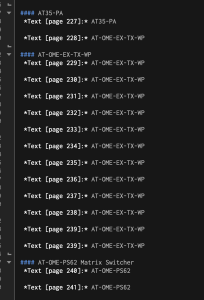
    Here’s where the “export annotation summary” feature of PDFExpert comes in. I exported it all as Markdown (it supports text and HTML as well) and opened it up in BBEdit. From there, I could easily see every annotation, and can then go back and use BBEdit’s diff feature with the new document when I get it. From there, the sane thing will probably be to just move the new pages into my existing PDF and add them to the table of contents.

    Image in BBEdit of the Markdown annotation summary. Lists concurrent pages of the same annotation text.

    I’ve been using PDFExpert for several years now, and never had to use this feature, but I appreciate reading how other people handle unique problems with odd solutions, so I figured I’d share my own experience here.


    1. For what it’s worth, I’ve gone the standalone purchase route rather than the subscription for PDFExpert. ↩
    2. If this sounds arduous, it was only about 75 different items – a few products had hundreds of pages of documentation, others had one or two. ↩

    Ehler

    2024-02-24
    Technology
    apps, mac, PDF
  • Using Marvis Pro

    When I made my recent post on what apps I’m using for what purposes, I mentioned that I’ve been using Apple Music as my music service (as I have since the day it launched in 2015). But I neglected to mention an important app I use as part of that: Marvis Pro.

    There are things I like about Apple Music and things I dislike about it – and many of those dislikes center around how rough Apple’s Music app itself is in different ways. Marvis Pro is the middleman I use for interfacing with Apple Music to solve that. It’s so much nicer to use on a daily basis, and just feels better. Whether or not it’s actually faster at getting me to the music I’m looking for, it feels faster. For those who like to fiddle with things, it’s incredibly customizable (though I don’t take advantage of this very much). Two other killer features for me:

    • last.fm integration: It scrobbles anything I listen to through the app, which I find much more reliable than a dedicated scrobbler app. I know it’s not as popular as it was a decade+ ago, but I still like last.fm. Marvis also has really good settings for its scrobbling, including filter lists (so when I’m playing accompaniment tracks with my beginner band, it’s not scrobbling those).
    • The option to share through song.link: I have lots of friends who use Spotify or another service, and when I share a link to music, I like to make it accessible on those services rather than just sharing the Apple Music link. This isn’t enabled by default, but when I go to share a song, Marvis defaults to song.link instead (e.g. it would generate this link instead of the Apple Music link)1.

    For anyone using Apple Music, I recommend picking up Marvis. The only downside is that it’s only on iOS and iPadOS – I would argue that the Apple Music app is at its worst on the Mac, where I’ve yet to find a good substitute.

    As a hat tip, I discovered Marvis in the first place through this post – there’s actually a lot of great third-party apps that work with Apple Music (which is one of a few things that keeps me with it over Spotify despite my complaints). I played with most of the apps in that review to land on Marvis Pro myself. MacStories also had some good coverage of Marvis when it came out that explains some more of the appeal.


    1. As it happens, this doesn’t currently play nice with MusicBox which I’m also using pretty extensively. I can get around that by opening the Apple Music app itself and sharing directly from there into MusicBox (generating the regular Apple Music link instead of the song.link), or I can use a handy Shortcut I’ve made ↩

    Ehler

    2024-01-13
    Personal, Technology
    apple, apps, music, music streaming
1 2 3 … 5
Next Page→

Verfications: proven.lol/569f76

Mastodon

Blog at WordPress.com.

  • Subscribe Subscribed
    • Ehler
    • Already have a WordPress.com account? Log in now.
    • Ehler
    • Subscribe Subscribed
    • Sign up
    • Log in
    • Report this content
    • View site in Reader
    • Manage subscriptions
    • Collapse this bar