Ehler

Ehler

Thoughts and resources on music, education, and more.

  • Home
  • Resources & Projects
  • About
  • Resources on Github
  • @ehlerMastodon
  • YouTube
  • SoundCloud
  • LinkedIn
  • Last.fm
  •  Music
  • Letterboxd
  • Contact
  • Some Thoughts on Blogging

    I wanted my own website early on from my youth. Despite always being into computers, I never saw myself working in technology, even before I saw myself working in music (which is, funnily enough, the exact inverse of a lot of stereotypical ‘band kids’ I feel). In elementary, I remember going nuts on FreeWebs with my friends, and in Boy Scouts, one of many things I did poorly was a brief stint as our troop’s webmaster.

    When I got done with college, I figured what I wanted was a personal base from which to share things with and for other music educators. After a lot of agonizing over a domain that wouldn’t be my first choice, I eventually bought a few, and decided this one would be my permanent home. And after feeling like I just needed to start, I chose to do a WordPress.com blog over SquareSpace because it would work with MarsEdit. I thought about looking into more options down the road beyond that, but I just got to blogging.

    I don’t post as often as I’d like on this blog, but it’s not for lack of inspiration – I have a project for this blog in OmniFocus, and it has lots of article ideas. Beyond that project, there’s mostly-written articles in Drafts and iA Writer – I can think of three quite long articles that I’ve had on the back-burner for awhile without even looking.

    No, the biggest roadblock to posting on here is that I feel the need to be more thorough than anyone would deem necessary. If brevity really is the soul of wit, then I’m a dullard. As a result, it takes a lot of time to actually write a post.1

    If I were a lot less busy, I’d finish a lot more posts (and a lot more projects of every sort.). I’ve been doing some surfing of different independent blogs (beyond my regular reads in RSS) and have been regrowing my appreciation for the art of blogging. I was encouraged to write this by Matt Mullenweg’s own post (for those that don’t know, he founded WordPress, and is one of the biggest tech people who doesn’t actually suck; very cool guy instead).

    For the last several years, I’ve seen increased dissatisfaction with a lot of different social media sites. From biases in algorithms, to moderation decisions (or lack thereof), surveillance, adtech… there’s a lot of reasons people have been upset, and with good reason. While one’s blog sits as a separate island (enough that I, like most people with a blog, will share links to my posts on my social media accounts), it has a huge value – at the end of the day, you own your own blog. Even with a paid service instead of self-hosting, you can just get up and leave. I’m actually thinking about ditching WordPress entirely for a different kind of site, so I exported everything and converted it all into Markdown files that I could move to a new site if I wanted to.2

    If you’re interested in starting a blog, there’s lots of options, some easy, some not. Some include:

    • Start a WordPress.com blog, which can be free for their most basic features
    • micro.blog for cheap (awesome in that it exists in this space between being a full blog, and being a short form posting site like Twitter – somehow the best of both worlds, and works with ActivityPub services like Mastodon)
    • Bear Blog for free (I believe)
    • Neocities for free or low cost
    • A jillion other very affordable and easy-to-use options out there like Blot.
    • On the more complicated side (and what I’ve been looking at) rolling up a static site generator, and probably using a Jamstack service which generally provide free hosting good enough for any personal blog.
    • Also more complicated: hosting your own CMS like WordPress (sometimes called WordPress.org) through a hosting provider.

    It’s just cool to have your own space on the World Wide Web. I see a lot of people coming up with so many solutions that they don’t really own, and it’s nicer to be the master of your own domain.3 You don’t have to have the perfect solution to get started, because it’s so easy to migrate what you’re doing after the fact (though more of modern technology seems to be training us to not expect that – the ‘indie web’ is resilient specifically because of that.


    1. Believe it or not, I do actually have a process for going back to edit posts, but I still discover lots of dumb typos or, more often, missing words on old posts when I read them. ↩
    2. Wordpress is very cool and good technology, it’s kind of complicated why I’m thinking of switching off, and there’s a good chance I don’t, because that’s a lot of work that I don’t have time to put into this blog. I’ve gotten this itch the last two years right at the beginning of the calendar year, but as work gets busy again, it always winds up a dream. ↩
    3. ↩

    Ehler

    2024-01-10
    Personal, Technology
  • My “Default Apps” of 2023

    My “Default Apps” of 2023

    I happened across this post from Carlo Zottman1 and was inspired to do my own. I did dig through the people he gave attribution to (and discovered some interesting apps that I had not even heard of before) until getting back to the source of this trend which is a podcast called Hemispheric Views, which I was previously unfamiliar with.

    One of the neat things about this trend (to me) is more about discovering new apps2 and seeing how different apps might get used together to better synergize one’s work. Someone has compiled a single source for a ton of these to go through!

    In some ways, this is a brief update to my older tech set-up post. It’s also worth noting that the original conceit of the podcast episode was centered on how much one could use the default apps (e.g. Apple Notes or Reminders) – but this is not something I aspire to in the slightest.

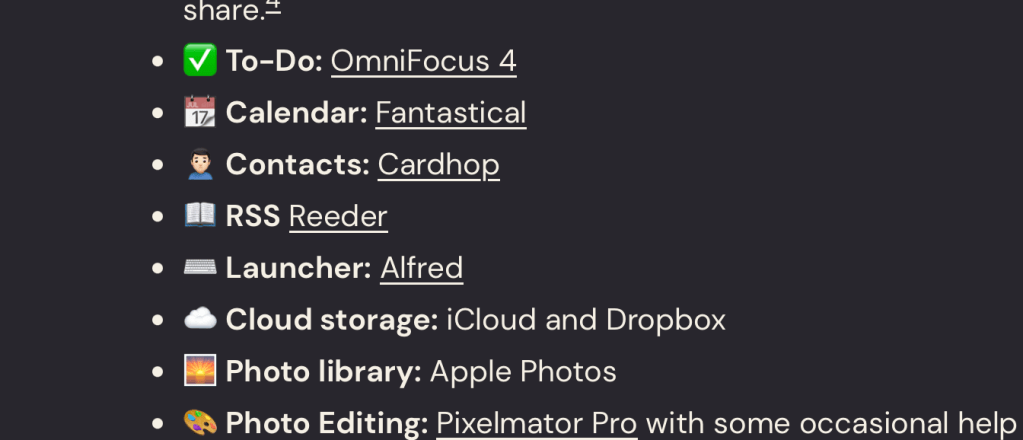
    My Default Apps

    • 📨 Mail Service: Gmail
    • 📮 Mail Client: Regrettably, Airmail3
    • 📝 Notes: Very complicated. Obsidian and Bear are the two primary apps I’m using here (with a clear delineation in my head between the use of the two) but everything starts in Drafts, which is integral to my system. I also employ Agenda for my rehearsal plans and Craft for many work resources I need to share.4
    • ✅ To-Do: OmniFocus 4
    • 📆 Calendar: Fantastical
    • 🙍🏻‍♂️ Contacts: Cardhop
    • 📖 RSS Reeder
    • ⌨️ Launcher: Alfred
    • ☁️ Cloud storage: iCloud and Dropbox
    • 🌅 Photo library: Apple Photos
    • 🎨 Photo Editing: Pixelmator Pro with some occasional help from its sibling, Photomator
    • 🌐 Web Browser: Safari
    • 💬 Chat: iMessage preferred, too many in actuality.
    • 🔖 Bookmarks: I consider DEVONThink to be my ‘bookmarking’ app
    • 📚 Reading: Kindle’s iOS app primarily
    • 📑 Read It Later: Readwise Reader
    • 📜 Word Processing: Pages
    • 📈 Spreadsheets: Numbers, primarily
    • 📊 Presentations: Very rarely, but iA Presenter has actually been taking this over for me.
    • 🛒 Shopping Lists: Grocery or Bear
    • 🎵 Music: Apple Music
    • 🎤 Podcasts: Overcast
    • 🔐 Password Manager: 1Password
    • 🤦‍♂️ Social Media: Mastodon is my primarily accessible place these days5
    • 🌤️ Weather: CARROT Weather
    • 🔎 Search: Google
    • 🧮 Text Editor: BBEdit and SublimeText
    • 🐘 Mastodon Client: Primarily Ivory with Mona and Toot for specific roles

    Other updates

    Skimming through my old set-up post for the first time in awhile, it is worth noting a few apps I’m not using anymore in favor of a better solution:

    • AnyTune has beat out Capo for me when it comes to slowing things down, pitch shifting, and similar features. Capo is more focused on guitar players (as the name implies). Hat tip to Robby Burns for initially getting AnyTune on my radar years ago – it has been incredibly useful over my teaching career on a regular basis.
    • I continue to use OmniOutliner, but Bike is a new outliner that I find myself using a bit more lately. Both are good and useful, and I will continue to get use out of both.
    • As I’ve mentioned on multiple occassions, Dorico is my notation app of choice today. I don’t currently have a working version of Finale or Sibelius installed on my Mac.
    • Speaking of Macs, while I won’t get into the hardware weeds, suffice it to say all four pieces of Apple hardware that I mentioned on that original post has been upgraded (plus the addition of an Apple Watch). The Apple Silicon era is amazing on the Mac.
    • I previously mentioned Stamp (which has rebranded) for transferring playlists between streaming services, but I now use Songshift for this purpose exclusively
    • There’s also Cleanshot (again, I don’t aspire to use default apps) and iStat Menus which I’ve seen some people mention in their posts on this topic.

    1. I follow Carlo on Mastodon – he’s on my radar in the first place because of his awesome Shortcuts apps – even if I’m not a huge Shortcuts power user ↩
    2. One I saw mentioned a lot on the posts I checked out that I’d never heard of before was Omnivore ↩
    3. I’ve been unhappy with Airmail for quite some time now, but it has a few killer features keeping me on it. I’m optimistic that one day I’ll be able to switch to Mimestream which doesn’t yet have the features I need, but has them as prospective features on its roadmap. ↩
    4. I’ve been meaning to write about how I’m using these different notes apps for awhile. As complicated as it sounds to have five ‘notes’ apps, each one occupies a very different role. While I’m at it, I want to write about my usage of Text Editors in the same vein. ↩
    5. On the topic of things I’d like to write about, I’ve been meaning to write about moving over to Mastodon since the start of last year. It’s neat over there, and the apps for it are really good. ↩

    Ehler

    2024-01-02
    Technology
    alfred, dorico, drafts, email, omnifocus
  • Dorico 5.1

    Dorico 5.1 is out, and it’s a fantastic update!

    But wait, I never did get around to posting about Dorico 5 when it came out in…May?

    Well, to my credit, I did write about it. I was relatively satisfied with it, but there were a lot of people on the official Facebook group and the official Dorico forums who were upset by the perceived focus on playback features.

    And then Daniel Spreadbury made this post1. While it’s been a minute since it was originally written, I find it just as necessary now to highlight as I did then. It’s a long read, but I highly encourage reading it in its fullness. It’s a masterclass in public relations, in transparency, and in humility – something that I find to be depressingly absent from so much modern discourse, especially online.

    So if you want my initial thoughts on Dorico 5.0, I threw them up as a Github Gist2. It’s a mostly finished post.

    So onto Dorico 5.1: Long story short, it delivers on the whole point of “there are great point releases coming.”

    To me, the most exciting features are the ‘instrument families editor’ and the ‘score order editor.’ I haven’t had enough time to figure out if the former will allow me to make the default transposition for a euphonium to be concert pitch, but I’m hopeful once I get some time to treat it as the most important thing in my life. The latter proves to a be a good workflow improvement to anyone who wants something outside of the existing score orders on a recurring basis (the program can already handle ‘no score order’ in a single project, but if you wanted to reuse that order or add additional players on existing instruments, I could see how this improves things). The update also brings a proper jazz band score order, so to my mind that only leaves brass bands and small ensembles (like woodwind quintets) that the program doesn’t already offer out of the box. I remain grateful for the existing band score order that ships with Dorico, in the hopes that it will save people from making ill-informed decisions.

    There’s a lot of other features, too! The crashing of the audio engine has long been one of the most frustrating crash states the program can hit (though it’s been rare for me) as it’s previously been unclear to many users how to get the program to start again after this occurs. Knowing to force quit the VSTAudioEngine process is no longer necessary, though, as the program can solve this itself now.

    Playback improvements continue with Iconica Sketch and playback for fermatas. For the latter, it really feels like a finally. I understand that development requires prioritization, but it’s really felt like a limitation for awhile. That said, the immense and granular control continues to reinforce the idea that the “Dorico way” isn’t simply doing the thing, but doing the thing with as much customization and flexibility as one could ever desire. Their ethos continues to seem to be that “we won’t put a feature out until it’s going to be everything we feel it needs to be,” even when those features sometimes feel overdue with how mature Dorico has gotten.

    The last feature work explaining anything about is the support for a subset of Markdown in project info. Entering text like “The Musical – *Chairs*” can now render “The Musical – Chairs” in the output. The subset of Markdown here is just *Italic*, **Bold**, and ***Both***. _Underscores_ substitute in for asterisks on all three formats for those who prefer them. Given the place this occupies, I don’t think any other parts of the Markdown spec really make sense, though when making worksheets that feature a lot of content in a text frame… maybe this lays the groundwork for further improvements.

    Other quick notes/highlights are:

    • Edit history
    • Stats panel
    • New text export features
    • Improvements with cautionary key signatures
    • Rhythmic slashes in cues
    • Hidden input in popovers!
    • Printing individual flows as separate files

    These are all nice features, some of which satisfy long-standing entries on my personal wishlist and some I didn’t realize I really wanted. I’m greedy, so I’m already hoping for 5.2 goodies.

    For more coverage on this, Scoring Notes has a good breakdown, and the official Dorico blog has a lot of video explanations.


    1. This is on Facebook, but it should be publicly available, even if you don’t have an account. ↩
    2. I actually prefer Pastebin to Github Gists in general, but for Markdown formatting, Github is hard to beat. ↩

    Ehler

    2023-12-24
    Music Education, Technology
    dorico, notation software
  • Knotwords

    I’ve been meaning to post about a lot of different things and failed to get around to it (including Dorico 5!)

    My students often talk about Wordle, and on Mastodon (another topic I’ve meant to post on!) I see discussion about it and other word games. Wordle never clicked for me, but a game that I consider in a similar vein has: Knotwords.

    Knotwords is by Zach Gage, who I already thought made great phone games before Knotwords (his Good Sudoku took me from liking Sudoku to being at least a bit good at it). Knotwords is a word game that is like a crossword puzzle that’s about unscrambling words, rather than solving clues. It’s better played than explained.

    Some might say it’s cheating, but I like to play with the ‘Correct Word Feedback’ setting, rather than the default ‘valid.’ Maybe one day, I’ll play it the real way, but for now, I enjoy it with that setting enough to rack up a 474-day streak. It’s available on iOS and Android and even Steam. On the former two, you can play the “real” game without paying anything, though you’ll want to pay when you play a bit to really get your fix and develop your muscles with the access to additional puzzles.

    Ehler

    2023-09-25
    Personal
    games
  • Apple Music Classical: A Nice Start, Needs Some Air

    This evening, I got my notification to download Apple Music Classical, which I’ve been eagerly awaiting for awhile now.

    My first impressions are quite positive. Breaking away from the simple ‘song-album-artist’ scheme to get more advanced metadata (works, composers, ensembles, conductors) is not just welcome, but handled very well in the app. It’s a very nice way to find and engage with classical music.

    This has been in the works for some time, and I wouldn’t be showing proper excitement at something if I didn’t immediately have some complaints with it.

    It does a pretty good job of the sort of thing you’ll see on major classical labels, but I feel like it has room to grow when it comes to the symphonic/wind band. There are ensembles I’ve encountered that don’t have their own page, others with multiple pages for the same ensemble breaking apart their catalog, and while I can sympathize with it being a ‘harder’ task than orchestral works, I still feel it’s worth doing. If you’re looking under the ‘genres’ section, you won’t see anything for wind band. It certainly seems as if the line they’ve drawn for “classical” is sufficiently wide to encompass the wind band idiom, given the presence of soundtracks for film and video games.

    Still, it’s nice to finally have this app! I think it’s a promising way to surface the source of transcriptions with students more quickly and meaningfully (rather than sticking to the top recordings that a search might pull up in the main Apple Music app), and for any students who use Apple Music, provides a great starting point to getting them to listen to more of their own instrument through those featured browsing sections. I’m hoping that they soon improve their handling of wind bands so that I can pull more recordings into class on the fly, rather than relying on existing playlists I’ve found or made.

    Ehler

    2023-03-27
    Music Education, Personal, Technology
    apple, listening, music streaming
  • forScore 14

    A new version of forScore is out today, and it brings a very exciting new feature for educators, along with other improvements noted on the official site.

    Since 2018, forScore has had support for URL schemes, and pretty good ones at that. To me, the best use of URL schemes in forScore are in being able to link scores or pages within a score – this makes it easy to drop those links in a rehearsal plan, or a student’s lesson log to quickly jump between necessary music while teaching. Until now, though, there hasn’t been a great way of generating these URLs to a score. There’s a handy tool at the bottom of this page to help you build those links, but it requires too much work by hand.

    In version 14, there’s now an easy way to generate these links within the app with one of two shortcuts. ⌃⌥⌘C will quickly copy the ‘most verbose’ link to your clipboard, which is what you would – more than likely – always want. ⌥⇧⌘C will generate a quick interface for you to pare the link down a bit (e.g. if you are on page two of a score inside of a setlist, you can optionally get the link to just your current score without triggering the setlist, or without necessarily getting the current page as part of that link). If you don’t use a keyboard with your iPad (this feature is available on the Mac too!) you can also generate these links by going through the regular share icon1.

    forScore’s organization with setlists has me organizing things by ensemble, but this will allow me to be even more flexible. I’ll be able to have one-off sheets linked in my rehearsal plans without them cluttering up that ensemble’s setlist until I finally decide to do some cleaning. I can keep honor band music apart from the rest of the ensembles and just link to it from a student’s lesson log. Linking to individual pages out of books that I want to show students will be much easier2.

    Worth noting, this is a feature for pro users, but I would contend that forScore is deserving of that pro subscription from you if you find it even half as useful as I do.

    I don’t know that I’ve mentioned forScore on here before, as, when I did my big round up of apps I use, I wasn’t currently using it. At that time, I had an older, smaller iPad; while forScore ran just fine on it, between the screen size being a poor match for my eyesight and limited storage, I never gave forScore a serious try. Eventually, as my difficulty managing paper collided with having more students at more varied levels with a job change, I bought a 12.9” iPad Pro primarily for using forScore. Two years and some change later, it continues to be the primary thing that justified buying such a pricy piece of hardware. It’s indispensable in lessons, and I use it heavily with various groups I perform with myself outside of my teaching gig. While there’s other score readers, forScore deserves to be the first one you consider for any and all purposes. I have 536 scores in there, and that number’s only growing.

    I always like to share my appreciation of new updates with developers, and Justin, the developer of forScore, has recently made a big shift in how he manages his social media presence. He’s been very active on Mastodon, and is worth a follow on there.


    1. Sharrow, for those in the know. ↩
    2. Or, if I wanted to make a note to do something off a single page, it’d be very easy to link in OmniFocus! Or… a million other uses. ↩

    Ehler

    2023-03-06
    Music Education, Technology
    forscore, ios
  • Scale Dice by Way of Dice by PCalc

    Scale Dice by Way of Dice by PCalc

    Just last week, James Thomson celebrated 30 years of PCalc.

    I’ve been a user of his apps since getting my grandmother an iPad and wanting her to have a calculator.1 PCalc proved to be the best choice, because it remarkably customizable. Many of its power features (like RPN and custom variables) weren’t needs I had by any stretch of the imagination, but setting up a layout with only the essential buttons with fully customizable sizes was a great fit.

    Impressed with PCalc, I picked up his Dice app when it came out, not knowing what I’d use it for. At the time, I wasn’t regularly playing any tabletop games. Back when I was playing them in-person, I’d be loathe to give up physical dice (especially when I have a collection that is as large as it is). In the last year or so, I’ve started doing some online sessions of WFRP 4th edition, and using the dice rolling built into a virtual tabletop saves not just time, but means the system can do a lot of rules/math auto-calculations for you.

    But an idea came to me the other day for making use of this app, and I want to share what I’ve come up with.

    I’ve known many directors over time to use “scale dice” to help students practice their major scales with an element of randomness. In Iowa, this is a useful preparation for All-State auditions, but it can be a handy thing to do in sectionals and small-group lessons too. Dice by PCalc has support for custom dice, and these wind up looking great.

    Currently, the app supports six distinct dice designs on screen at a time (so it would be easy and practical to have six different students at once get assigned a scale with a single roll)

    You can configure these dice yourself, but I’ll save you the work by sharing my “custom dice” export here.2

    How to Use These

    These are instructions for using them on the Mac where keyboard shortcuts can save you a lot of time. It works just fine on iPhone and iPad, but it’s a little less nimble unless you have an iPad keyboard.

    • You get six different slots for a style/configuration (no more)
    • Switch between them with ⌥1-6
    • Randomly select a style for that slot with m
      • Will override the style for that slot, so if you have a die on the board of that style, it will change it
      • If you prefer to set a specific style, you can do so by using the style dropdown menu, or tapping on the dice colors on the top of the screen on iOS.
    • Once you have scale dice loaded, hitting 8 on the keyboard will throw one of whichever slot you have selected
      • Hit the … button on the left to select the scale dice.
    • You can add as many to roll at once as you like
    • The Space bar will reroll them all at once

    Dice PCalc Demo

    How to Import These

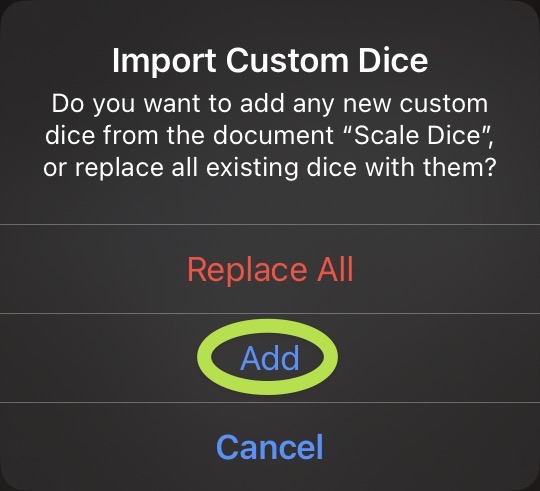
    After downloading the custom dice file, you should just be able to open it and it will open up Dice by PCalc. Then just hit add. If it’s not loading by just opening the .customdice file, open the custom dice pane yourself (the … button on the left), click “Edit” and the select the folder icon on the bottom left of the pane.

    Add Custom Dice Prompt

    On Rhythm Dice

    While I don’t really have a use for them.3 I know a lot of general music teachers like to use rhythm dice of one form or another. I tried my hand at creating some, but they don’t really work all that well. Dice by PCalc is able to support any unicode character and SFSymbols. It’s not, however, able to support a separate font entirely. Unicode has many different musical glyphs (which you can view with ⌃⌘Space), but they tend to render kind of strangely. When playing with it, a handful of the glyphs just didn’t render well (or right together) on the dice. I assume this is because of font mapping of these characters.4

    I’m hopeful that SF Symbols adds support for more music notation glyphs in the future, and if it does, that might open the door for some rhythm dice here.


    1. At time of writing, I thought a more recent iPadOS version had finally added a stock calculator – but there still isn’t one. PCalc, then, is my top recommendation in this space! ↩
    2. Eagle-eyed readers might notice that this link is not pointing to Dropbox, but to Github. I am most of the way through a project to migrate everything I’ve previously shared on this blog from Dropbox to Github. ↩
    3. I also don’t have that much of a use for these scale dice myself, actually, but I don’t let that stop me from writing ↩
    4. The offending characters in question were 𝄽, ♪, and 𝄾 for those particularly curious. The weird rendering you’re probably seeing in your browser for them is a good indication of why they’re so weird on the dice ↩

    Ehler

    2022-12-30
    Music Education, Technology
    notdorico, resources
  • MarsEdit 5

    MarsEdit 5 is out, and I continue to be happy to use it. One of the new features in it is called “Micropost” which is great for people who use a service like Micro.blog. Ostensibly, it can make it more “frictionless” to post, encouraging more frequent posting. It will not, however, help me to post more. As I am able to demonstrate in this very post, the root cause of me not posting more than I do is not how difficult it is to post, but that I feel the need to establish more context than is (maybe) really necessary in order to have a post feel “finished.”

    Ehler

    2022-12-25
    Uncategorized
  • Dorico 4.3: I’m Running out of Things to Complain About

    I’m Ehler, and I love to complain. Dorico 4.3 is now out, and those folks at Steinberg have taken away things for me to complain about.

    The biggest thing for me – and I imagine, most people who ever write for percussion – is a new “tremolo” behavior that is very useful when writing percussion rolls. Because Dorico understands two notes tied together as one note in actuality, applying a tremolo to the first note in a tie chain applied it to the last note as well. Many percussion rolls, however, need to show the final note without any tremolo slashes. Prior to 4.3, this would require a trip to engrave mode to disable the single stem tremolo property on the final note in a tie chain.
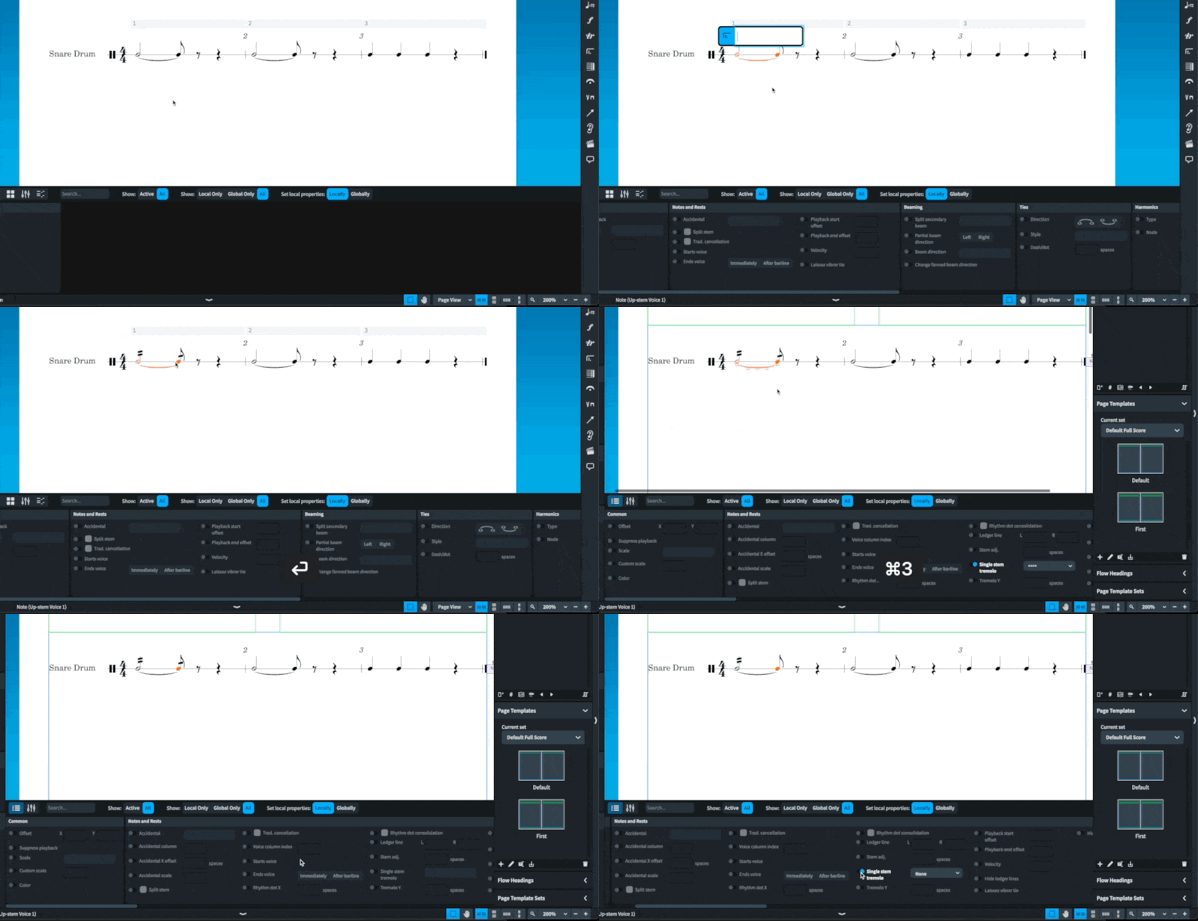
    Old Roll Method

    On its own, not particularly cumbersome. But this is a very common way of writing rolls, and in a given snare part, one may have to do this dozens of times.

    The new method is much better. No changing modes, no properties panel. Just adding rel at the end of your tremolo input in the “Create Repeat” popover (e.g. 2rel or //rel) omits the tremolo/roll slashes on the final note.
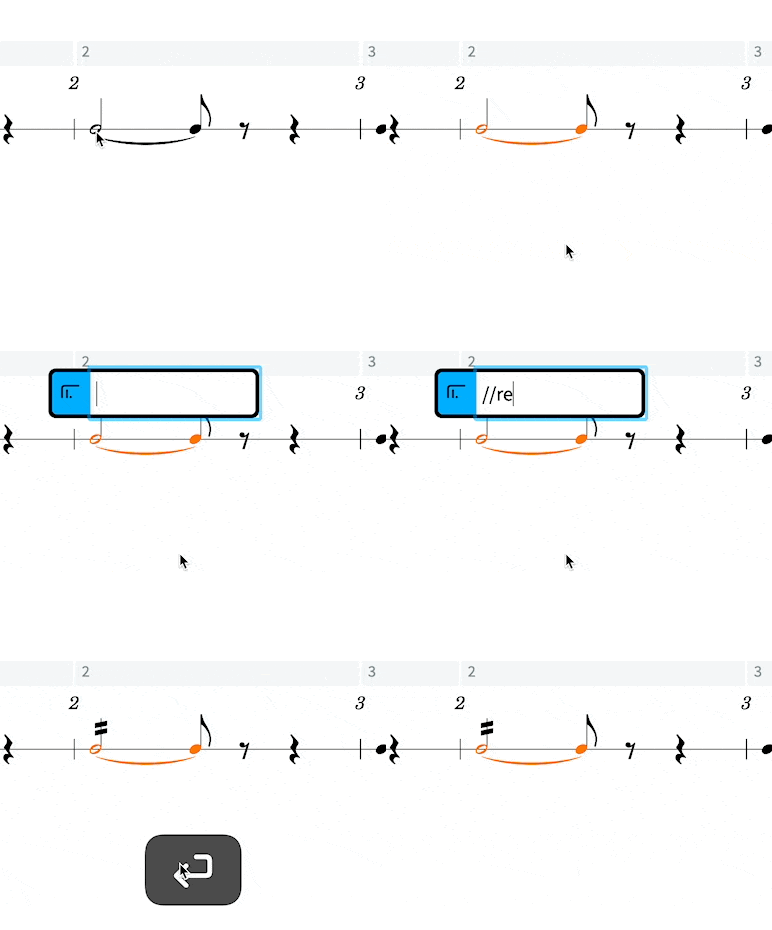
    New Roll Method

    This, to me, is really the biggest improvement that percussion part writing needed in Dorico, and is most welcome. This one change is the highlight to me of a very meaty update. I won’t even talk about the impressive chord realization features, mostly because you should read David MacDonald’s post on Scoring Notes instead, but also because I’ve got two other things to gush over.

    The first is a small change that will save me a lot of headache, and is kind of hard to understand. In most projects of any type, I do most of my writing in the score rather than the parts, in page view. As a result, when I need to change something from its default option via the properties panel I change it in the score. But Dorico has had for some time the concept of “local” and “global” properties – whether the property change should apply just in your current view (e.g. in the score but not the part) or everywhere it can be affected (in both the score and the part). There are times changes in one but not the other are definitely desirable, but the end result has been me forgetting to click the global button before making changes for years now and then having to go back and click all those properties again.

    They have now let you change the default behavior. The only downside at all is it was a bit hard to find, and I had to pull up the version history to find it. Under the main preferences (⌘, on Mac), Note Input and Editing, it currently resides as the final entry before the “Editing” section
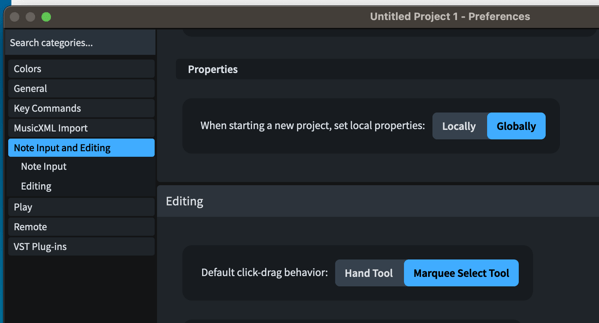
    Properties - Set Local Setting

    If the description of what this does made no sense to you, then you’re probably also the kind of person who should turn this on.

    The last exciting feature of this release is the addition of some new commands and properties: Hide notehead and hide stem. These will allow easier creation of new kinds of worksheets for educators, I’m sure. This last summer, I had a handwritten resource from another educator from a jazz symposium I was given that I was excited about possibly using. Being a gigantic nerd, though, I was trying to think through how to make it in Dorico and was a bit disappointed that I couldn’t come up with good ways to do so. Before 4.3, I’ve now been convinced that it’s possible – over on Scorico, Hanneke Hommes has a series of worksheets she has made that I found inspiring in pushing Dorico to its limits. But these new features will make things like this even easier.

    Now I have a bit of crow to eat. Despite considering myself a bit of an enthusiast, I don’t read every line of the version history documents for Dorico. Especially in the 4.x series, which has had a lot of improvements to Play Mode that are not of particular relevance to my own needs. The team at Steinberg is very thorough in these documents, and if you wanted an exciting read during your travels over Thanksgiving and Christmas, you could do a lot worse. But I missed an addition in 4.1 that also solved a standing complaint of mine.

    I am quite colorblind. So much so that my students and I get to joke about it. And as such, I don’t really lean into color coding of things very much. But, when I was a student, I found it very beneficial in Finale and Sibelius to have out-of-range notes on instruments colored red, which was fairly visible. Now, Dorico has had this feature (I believe since 1.0). But the shade of red Dorico has used has been a very, very, dark red for my colorblind eyes. I can see that it is different from the black notes, but I have to be looking for it. When I was younger, this would have still been of value, but these days, any parts I am writing I’ll just notice that the note is out of range before I’d notice the difference in color (unless I was reading an irregular transposition of an instrument or working with instruments I’m not used to).

    And I am very glad to have recently noticed1 the setting in Preferences now to change the note range colors. I don’t know if there were previously separate color selections for “standard” vs “advanced” range, but switching the shade of red for the former to match the latter was the perfect solution for my problem, and I’m incredibly appreciative of the option.

    So what do I get to complain about now?

    From criticisms I’ve brought up before, this really solves the percussion matter and the colorblindness thing. Improvements I’d like to see to Engrave mode aren’t really “complaints,” but continuing to make more powerful things possible with fewer overrides, more intuitive frame chain behavior, etc. are very desired. Also, even as I get a better sense of how Dorico the program understands flow headings, it’s still easy to be frustrated with them.

    I’ve heard folks from Steinberg defend things that aren’t bound as shortcuts. I understand their case, and I still don’t agree. To quote myself on this:

    Part of using music notation software efficiently is learning the shortcuts, but in Dorico, there’s an awful lot of important things not bound. Things like the sub-modes within the Engrave mode need to be bound. It’s one thing to expect your power-users to change the bindings, but it’s frankly a cop-out to leave so many things unbound. These are decisions that should be made by the developers. Undecided decisions are a shortcoming in your design; after all, to quote a guy who was an okay semi-successful designer: “Design is how it works.”

    This may never change, but I still find it to be a problem in my personal use, and it’s still a philosophical problem I have when I advocate for Dorico to others.

    Other complaints are pretty small, but I bet other band directors have them too. I’d like to be able to change the default transposition on instruments. I almost always want euphoniums in bass clef/C. It’s only a bit of work to click that every time I add them to a score, and I can save templates where they’re in C, but if I want to use the fancy new ensemble picker from 4.0, I need to then go in and change the euphonium’s transposition. And that ensemble picker is slick.

    While we’re at it, I would still love for a setting to remove transpositions from player (and layout) names without having to do it manually. Again, I should be using templates more than I am, which would mostly alleviate this, but the Dorico team has taken away so many other things to complain about from me. And it’s possible this is the sort of minor thing they’ve slid in as an improvement that even I’ve missed somehow. There are some other snaggles here and there, but they’re minor enough that I’d need to look through my forum browsing history to remember them.

    Beyond “complaints,” I’m really hopeful roman numeral support is around the corner. The figured bass additions in 3.5 are still wildly good, and I’m surprised that roman numeral analysis wasn’t right on their heels. MusAnalysis is a very fine substitute for the feature itself, but I’m hungry for the real thing.

    Dorico has been revolutionary in what it’s done, and I’m almost kind of bummed not to have a longer wish list than that, because I’m afraid for what that means for innovation in the space of music notation software. Thankfully, the folks at Steinberg have a far greater imagination than I do, so I’m excited for far more than just roman numeral features in future versions of Dorico.

    I really would get more work done in Dorico though if I could have a coffee-stained background. Perhaps they’re waiting to innovate on that too by dynamically adjusting where the coffee stains appear based on some ability to sense my actual current coffee consumption.

    1. It was while looking for the global/local properties option in preferences. I looked really hard and I couldn’t find it until I cracked the version history. I knew to look in preferences (not notation options, engraving options, layout options, note input options or any library settings) and it was just really hard to find, okay? ↩

    Ehler

    2022-11-15
    Music Education, Technology
    dorico, notation software
  • Band Score Order in Dorico 4.0.10

    Dorico 4.0.10 came out today, (SN post) which, as befitting an X.0.Y release is mostly bug fixes. I normally don’t write about any point updates for Dorico, but I felt the need to follow up on one thing from my post just a few weeks ago on the release of version 4 with the exciting news that Dorico’s score ordering feature now supports band score order in addition to orchestral score order!

    Using Band Score Order

    It’s a little tricky to find the band score order toggle; you do so by right-clicking the sorting icon at the bottom of the left-pane, which will give you options between different score orders (leaving room for more to come).

    Finding Band Score Order in the interface – right-clicking

    If you set that right from the start, then as you add instruments, they’ll appear in the correct order. If you unwittingly were working in orchestral score order first and need to then adjust, simply switch it over to band score order and then left click the same icon again to have it impose that score order on your players.

    Sorting an existing set of players with band score order
    It may behoove you to then renumber the layouts (in the Setup dropdown menu)

    From Here

    I had the privilege of getting to help with this list, but my own self-doubt when helping order all 610 instruments in Dorico for band and the lack of any single authoritative source on the matter means that an adjustment here or there might eventually be made by the smart team over there.

    It peeves me beyond all belief when anything is mis-ordered in a score. Horns above the trumpets are an obvious offender, and percussion (which is mostly the same with orchestral score order) is also particularly irksome. It was a fun project trying to find sources, and if I were made of time, I wouldn’t mind taking a trip to just pull a bunch of scores and try to find what has actually been done with oddball instruments that almost never make it into a concert band. But this new feature will hopefully be of use to everyone who writes for band in Dorico – at the very least saving them the clicking and dragging on every new score to fix where horns and bassoons should be.

    Ehler

    2022-02-02
    Technology
    dorico, notation software
←Previous Page
1 2 3 4 5
Next Page→

Verfications: proven.lol/569f76

Mastodon

Blog at WordPress.com.

  • Subscribe Subscribed
    • Ehler
    • Already have a WordPress.com account? Log in now.
    • Ehler
    • Subscribe Subscribed
    • Sign up
    • Log in
    • Report this content
    • View site in Reader
    • Manage subscriptions
    • Collapse this bar